
The prequalification email arrives on a Monday: "Upload your OSHA 300 Logs for the last three years, Excel preferred, by Friday." The safety manager opens three files, one per year, each with a name in column B for every case, and two of them with a privacy case where somebody typed the real name anyway. Sending them as they are takes thirty seconds. It also discloses medical information to a company that has no right to it under Part 1904.
You may keep the OSHA 300 Log in Excel if it carries the same information as Form 300 under 29 CFR 1904.29(b)(4), but before sending it to a general contractor you must remove the employees' names and other personally identifying information under 29 CFR 1904.29(b)(10); most prequalification packets are answered by the certified 300A summaries and the rates computed from them.
At a glance: An Excel Log is a legal equivalent form if it has Form 300's columns and follows its instructions (29 CFR 1904.29(b)(4) and (b)(5)). A GC has no right to it; if you share it, names and other identifying details come out, not just hidden (1904.29(b)(10)). Send the certified 300A and the rates first. Rates use OSHA's formula: cases × 200,000 ÷ hours, and for DART (H + I) × 200,000 ÷ hours. Watch the file itself: hidden columns, other tabs, partial filters, and cells that Excel would run as formulas.
What makes a spreadsheet an OSHA 300 Log
29 CFR 1904.29(b)(4) lets you use an equivalent form instead of OSHA's, as long as it has the same information, is as readable and understandable, and is completed using the same instructions as the OSHA form it replaces. 29 CFR 1904.29(b)(5) lets you keep the records on a computer, if the computer can produce equivalent forms when they are needed under 1904.35 and 1904.40. In practice that means the Form 300 columns, in order:
| Column | Heading on Form 300 |
|---|---|
| (A) | Case no. |
| (B) | Employee's name |
| (C) | Job title |
| (D) | Date of injury or onset of illness |
| (E) | Where the event occurred |
| (F) | Describe injury or illness, parts of body affected, and object or substance that directly injured or made person ill |
| (G) to (J) | Classification: death, days away from work, job transfer or restriction, other recordable cases |
| (K) and (L) | Number of days away from work, and on job transfer or restriction |
| (M)(1) to (M)(6) | Injury, skin disorder, respiratory condition, poisoning, hearing loss, all other illnesses |
Keep one Log per establishment, as 29 CFR 1904.30(a) requires, and one file per year. A workbook with three years on three tabs is fine for you, and a hazard when you send it, as we'll see below.
What a general contractor is owed
Under Part 1904, nothing. The rule gives copies to government representatives under 29 CFR 1904.40, and to employees, former employees, personal representatives and authorized employee representatives under 29 CFR 1904.35(b)(2). A GC is none of those. Sharing is a business decision, and 29 CFR 1904.29(b)(10) governs it: when you voluntarily disclose the forms to anyone else, you must remove or hide the employees' names and other personally identifying information. The rule lists the exceptions, such as an auditor or consultant you hired to evaluate your safety program; a GC's prequalification portal is not one of them. The article on the GC's request covers the legal side in detail.
Send the summary and the rates first
Most packets ask for a Log when what they really score is the rates. The certified 300A answers that without a single name: it is built to be posted where employees see it, under 29 CFR 1904.32(b)(5), and its totals and hours are exactly what the rates are computed from.
OSHA's recordkeeping forms package prints the formulas:
- Total recordable case rate (TRIR): total number of recordable injuries and illnesses × 200,000 ÷ hours worked by all employees.
- DART rate: (number of entries in column H + number of entries in column I) × 200,000 ÷ hours worked by all employees.
The 200,000 is 100 employees working 40 hours a week for 50 weeks. A worked example: 2 recordable cases, one of them a days-away case, and 96,900 hours worked. TRIR is 2 × 200,000 ÷ 96,900 = 4.13. DART is 1 × 200,000 ÷ 96,900 = 2.06. Take the hours from the 300A, where 29 CFR 1904.32(b)(2)(ii) puts them, so the rate and the summary can never disagree.
In Excel, with cases in B2, columns H and I in C2 and D2, and hours in E2: =ROUND(B2*200000/E2,2) and =ROUND((C2+D2)*200000/E2,2).
If the Logs must go: the column-by-column redaction
When the GC insists on the Logs themselves, work on a copy, never on your Log.
- (A) Case no. Keep it. It lets you answer a follow-up question without revealing anything.
- (B) Employee's name. Delete the column from the copy. Not hide: delete.
- (C) Job title. Read it. A title only one person holds, "night-shift crane operator", names that person.
- (D) Date. Usually fine. On a small crew, a date plus a title can identify someone; generalize to the month if it does.
- (E) Where the event occurred. Keep the area, drop details that point to one person's workstation.
- (F) Description. Read every line. Privacy cases should already say only "privacy case" with the generalized description 29 CFR 1904.29(b)(9) allows; make sure nobody typed more.
- (G) to (M). Classifications, day counts and types identify nobody on their own. Keep them.
Then say what you did, in the email: "Names and identifying details removed under 29 CFR 1904.29(b)(10)." It turns a blank column into a compliance statement.
The traps in the file itself
A spreadsheet carries more than the visible grid.
- Hidden columns and rows. Anyone can unhide them. Delete, then check with "Unhide all".
- Other tabs. A "2024 working" tab or a lookup sheet with the employee roster leaves with the file. Send one tab per year, nothing else.
- Filters. A filtered view exported as the "whole Log" is a partial Log. If you send a subset, say so in the file.
- Formula injection. A description that starts with =, +, - or @ can run as a formula when the GC opens the file. OWASP describes the attack; prefix such cells with an apostrophe so they stay text.
- Document properties. The author field can carry a name. Clear it before sending.
How HazComFast exports the Log
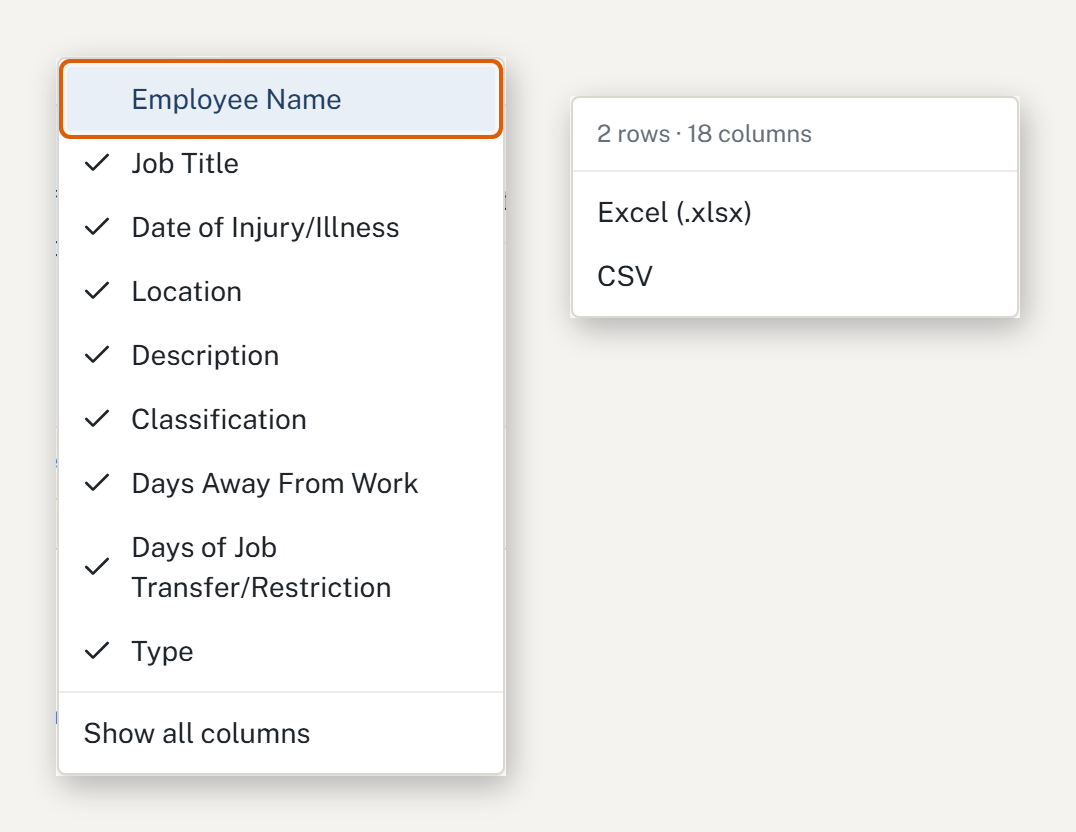
HazComFast exports the 300 Log as a real Excel file in OSHA's column layout, with the Form 300 headings as they are printed, from (A) "Case no." to (M)(6) "All other illnesses", or as a CSV. The Columns menu decides what goes into the file: untick "Employee Name" and column (B) is gone from the export itself. Before you choose a format, the export menu shows how many rows and columns the file will hold, and when the table is filtered, the file says on a line of its own that it is not the whole Log.
Privacy cases carry only "Privacy case" and their general description, in the Excel file as on the screen. A cell that starts with =, +, - or @ is written as text, so it can't run as a formula on the GC's computer. And every export lands in the audit log with its format, its row count and whether it was partial, so you can show later exactly what went out.
Answer the packet with the summary, send the Log without names
Fill the 300A free, compute your rates from it, or keep the Log in HazComFast and export it in OSHA's layout with column (B) left out.
Related: The GC wants your OSHA 300 Log. Do you have to provide it? · Who can see the OSHA 300 Log · Before you sign the OSHA 300A · OSHA Form 301, item by item
Sources & verification (read 2026-10-13): 29 CFR 1904.29(b)(4), (b)(9) and (b)(10); 1904.30(a); 1904.32(b)(2)(ii) and (b)(5); 1904.35(b)(2); 1904.40; Form 300 column headings and the incidence-rate formulas in OSHA's recordkeeping forms package; OWASP on CSV injection. General guidance, not legal advice.*
Frequently Asked Questions
Can I keep my OSHA 300 Log in Excel?
Yes. 29 CFR 1904.29(b)(5) allows records kept on a computer if it can produce equivalent forms when they are needed, and 1904.29(b)(4) defines an equivalent form as one with the same information, as readable and understandable, completed using the same instructions as the OSHA form. A spreadsheet with the Form 300 columns, filled in the way the form's instructions say, qualifies.
Do I have to give my OSHA 300 Log to a general contractor?
No rule in Part 1904 gives a general contractor a right to it. If you choose to share it, 29 CFR 1904.29(b)(10) says that when you voluntarily disclose the forms to anyone other than government representatives, employees, former employees or authorized representatives, you must remove or hide the employees' names and other personally identifying information.
Is hiding the name column in Excel enough?
No. A hidden column is still in the file, and anyone can unhide it. Under 29 CFR 1904.29(b)(10) the name has to be removed from what you send, so delete column (B) from the copy, then read job title, location and description for details that point to a person.
How do I calculate TRIR and DART from my OSHA 300 Log?
OSHA's recordkeeping forms package gives the formulas: total recordable cases times 200,000, divided by the hours worked by all employees, for the total recordable case rate; and the number of entries in columns H and I times 200,000, divided by hours worked, for the DART rate. Take the hours from the certified 300A, 29 CFR 1904.32(b)(2)(ii).
What should I send a GC instead of the named Log?
The certified 300A summaries and the rates computed from them answer most prequalification packets. The 300A is built to be posted where employees can see it under 29 CFR 1904.32(b)(5), so it carries no names, and the rates come from its own totals and hours.
Site-wide regulatory figures such as compliance dates and penalty amounts come from our regulatory source-of-truth modules, last checked against the eCFR, OSHA.gov, and the Federal Register on October 5, 2026. Last reviewed October 13, 2026.
About This Article
Published by: HazComFast
Published: October 13, 2026
Last Updated: October 13, 2026
This content is for informational purposes only and does not constitute legal advice.