
The inventory lives in a spreadsheet the previous safety manager built: 140 rows, a "Hazard" column with entries like "flam", "DANGER" and "see SDS", three different names for the same primer, and SDS links that open a supplier login page. Moving it into software takes an afternoon. Moving it so every product still leads the crew to the right SDS is the part to get right, because that link is what 29 CFR 1910.1200(e)(1)(i) actually requires.
To import a chemical inventory from Excel, keep the product identifier that links each hazardous chemical to its SDS, which 29 CFR 1910.1200(e)(1)(i) requires; OSHA prescribes no format and no CAS column. Map hazard columns to the supplier's classification, reconcile rejected rows and duplicates, and test SDS access with a worker's account under 1910.1200(g)(8).
At a glance: Any format works; the list uses the product identifier on the SDS (1910.1200(e)(1)(i)). No CAS column required; CAS numbers belong to ingredients (Appendix D, Section 3). Hazard columns follow the supplier's classification (Appendix C, C.2). Account for every row: added, duplicate or rejected. Test SDS access the way the crew will use it ((g)(8)). Keep the old workbook until the totals match.
What does the list have to keep?
29 CFR 1910.1200(e)(1)(i) requires "a list of the hazardous chemicals known to be present using a product identifier that is referenced on the appropriate safety data sheet". The definition of product identifier in 1910.1200(c) explains why: it's what lets someone cross-reference the list, the label and the SDS. The list can cover the workplace as a whole or each work area.
So the column that matters most is the product name, as it appears in Section 1 of the SDS under Appendix D. "Floor finish" in a purchasing column can be three formulations. If the supplier's identifier is more specific, that's the one to import.
How HazComFast imports a spreadsheet
Import your chemical list from a spreadsheet, hazard words or GHS codes, and each product lands with its pictograms, in the flammables total and the hazard filters. Export it and re-import it, nothing is lost.
Before anything is saved, HazComFast shows a preview with the number of valid rows, and each product with its manufacturer, CAS number, signal word and GHS symbols, so you see what the import will create. A row with a hazard value it doesn't recognize is set aside with its row number and the value in question, instead of being guessed. The same hazard code listed twice is kept once. The CAS number is optional, so a mixture without one doesn't need an invented number to get through, and a Spanish hazard word such as "Peligro" is read as Danger.
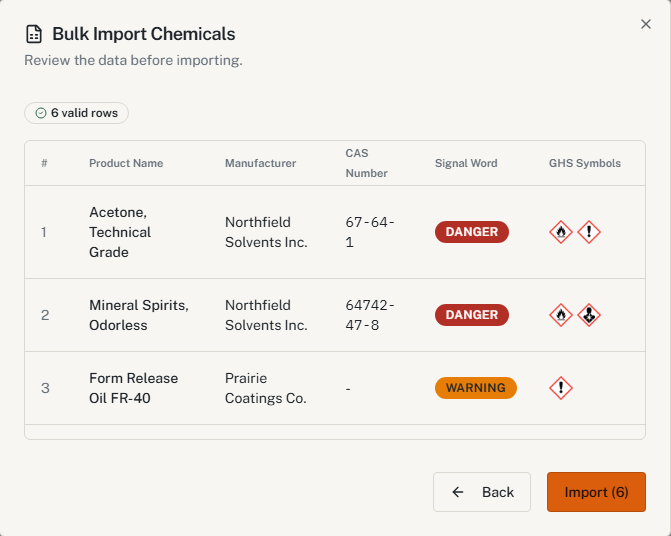
If the old spreadsheet is too far gone, the free chemical inventory template gives you columns to start from.
Map the columns before importing everything
Start with ten rows whose containers and SDSs you can put on the table. Find out what each spreadsheet column really holds. A column called "Hazard" can mean a hazard class, a pictogram name, a hazard statement or someone's shorthand, and those aren't the same data.
| Spreadsheet column | Check | Rule |
|---|---|---|
| Product name | Matches the container and Section 1 of the SDS | 1910.1200(e)(1)(i); Appendix D |
| Hazard class and category | Comes from the supplier's Section 2, not a guess | 1910.1200(d)(1); Appendix C, C.2 |
| Pictograms | Follow the class and category; some categories have none | Appendix C, C.2 |
| CAS number | Optional; an ingredient's number isn't the product's identifier | Appendix D, Section 3 |
| SDS link | Opens the right document with a worker's access | 1910.1200(g)(8) |
| Work area | The list covers the products present there | 1910.1200(e)(1)(i) |
Keep pictograms tied to classifications. A shorthand "flammable" doesn't tell you whether it's a Category 1 or Category 4 flammable liquid, and the label elements differ. If the spreadsheet only has pictures, get the classifications from the SDSs.
Account for every row
Reconcile the workbook against what came out the other side: added, matched to an existing product, rejected. A 140-row file that produces "131 added" leaves nine products to explain. If six were duplicates and three were rejected, write that down, with the row numbers and the reason for each rejection.
A rejected row is a product still missing from the list. Assign it to whoever can fix it: purchasing for a wrong SDS, the recordkeeper for a column mapping, the supplier for an unclear classification. Don't replace an unrecognized hazard value with the closest-looking symbol. Under Appendix C, the symbol follows the classification.
For a large file split into batches, keep the row ranges so nothing overlaps and nothing falls in a gap. Reconcile against the full original after the last batch.
The same paint under three names
Three jobsites buy the same primer and name it three ways. Before merging them, compare the manufacturer and the product identifier with the SDS. Similar names can also be different formulations, a gray and a white, a fast-dry version. The cross-reference to the SDS decides, not the spelling.
One product used on several sites stays one product with several locations. The list can be by work area under 1910.1200(e)(1)(i); it doesn't need a row per can.
Keep SDS access working through the switch
Under 29 CFR 1910.1200(g)(8), the crew reaches SDSs during each work shift without barriers. Before the old binder or shared drive goes away, have someone on the night shift open three SDSs from the new inventory with their own account and their own phone. A complete inventory behind a login the crew doesn't have is a binder in a locked trailer.
Training under 1910.1200(h)(3)(iv) covers how employees get to SDSs. Changing software isn't a new chemical hazard under (h)(1), but the route changed, so show it at the next toolbox talk. The HazCom guide covers the rest of the program, and construction follows the same rules through 1926.59.
From the spreadsheet to a list the crew can use
Start from the free inventory template, or import your spreadsheet into HazComFast and see every product with its pictograms before anything is saved.
Related: The chemical inventory template · Inventory from scanned SDS PDFs · How to read a safety data sheet
Sources & verification: 29 CFR 1910.1200(c) (product identifier), (d)(1), (e)(1)(i), (g)(8), (h)(1), (h)(3)(iv); Appendix C, C.2; Appendix D, Sections 1 to 3; 29 CFR 1926.59. General guidance, not legal advice.*
Frequently Asked Questions
Does OSHA require the chemical inventory in a particular format?
No. 29 CFR 1910.1200(e)(1)(i) requires a list of the hazardous chemicals known to be present, using a product identifier referenced on the appropriate SDS, for the whole workplace or by work area. Excel, CSV or software are all acceptable formats.
Is a CAS number required on the list?
No. 29 CFR 1910.1200(e)(1)(i) asks for the product identifier on the SDS. A CAS number identifies a substance, and Appendix D puts ingredients and their CAS numbers in Section 3. A mixture's product identifier is its name on the SDS, not one ingredient's CAS number.
Can I fill in pictograms from a general hazard column?
Only from the supplier's classification. Appendix C to 29 CFR 1910.1200, C.2, assigns label elements by hazard class and category, and some categories have no pictogram. A shorthand like 'flammable' doesn't settle a category.
Does an SDS link in the spreadsheet give employees access?
Only if they can open it. 29 CFR 1910.1200(g)(8) requires SDSs to be readily accessible during each work shift, with no barrier to immediate access when they're electronic. Test the link with a worker's access, not the administrator's.
Does switching inventory software require new HazCom training?
Not as a new hazard. 29 CFR 1910.1200(h)(1) ties training to initial assignment and new chemical hazards. But training under (h)(3)(iv) covers how employees get to SDSs, so show the crew the new route.
Site-wide regulatory figures such as compliance dates and penalty amounts come from our regulatory source-of-truth modules, last checked against the eCFR, OSHA.gov, and the Federal Register on October 5, 2026. Last reviewed October 14, 2026.
About This Article
Published by: HazComFast
Published: October 13, 2026
Last Updated: October 14, 2026
This content is for informational purposes only and does not constitute legal advice.