
Under 29 CFR 1904.41, covered establishments must electronically submit their prior-year injury and illness data to OSHA through the Injury Tracking Application (ITA) by March 2. The key question is which forms you submit. There are three triggers: establishments with 100 or more employees in an Appendix B industry submit the OSHA 300, 301, and 300A; establishments with 250 or more employees that keep records submit only the 300A; and establishments with 20–249 employees in an Appendix A industry also submit only the 300A. Critically, Appendix B lists one construction code (NAICS 2381, Foundation, Structure, and Building Exterior Contractors), so a qualifying 2381 establishment submits all three forms, while building construction (236), heavy and civil engineering (237) and the other specialty trades are not listed. This guide breaks down the tiers, the deadline, and exactly what to file, and how to actually submit it.
At a glance: ITA submission is due March 2 (1904.41), counted per establishment by peak employment. 100+ in an Appendix B industry (from construction, NAICS 2381 only) → file 300 + 301 + 300A (case-level detail). 250+ in any recordkeeping industry → 300A only. 20–249 in an Appendix A industry → 300A only. OSHA's electronic recordkeeping rule requires establishments with 100 or more employees in an Appendix B industry (from construction, that is NAICS 2381 only) to submit Forms 300, 301, and 300A through the Injury Tracking Application by March 2; establishments with 250 or more employees, and those with 20 to 249 employees in an Appendix A industry, submit only the 300A.
Which forms you file electronically (by establishment)
Deadline: March 2 for the prior calendar year, via OSHA's ITA (29 CFR 1904.41). Count by peak employment; the rule is per establishment.
The Three Submission Tiers in Plain English
OSHA's electronic recordkeeping rule sorts covered employers into tiers based on establishment size and industry. The triggers are easy to mix up, so here is the clear breakdown.
| Trigger | Employees | Industry | Forms to Submit Electronically | CFR |
|---|---|---|---|---|
| Appendix B | 100+ | Industry listed in Appendix B to Subpart E (from construction, NAICS 2381 only) | 300 + 301 + 300A | 1904.41(a)(2) |
| Large establishment | 250+ | Any industry required to keep records (not partially exempt) | 300A only | 1904.41(a)(1)(ii) |
| Appendix A | 20–249 | Industry listed in Appendix A to Subpart E | 300A only | 1904.41(a)(1)(i) |
The deadline for all three tiers is March 2 each year, covering the prior calendar year's data, per 29 CFR 1904.41(c). Note the two appendices are different lists: Appendix A is the broader set of designated industries whose establishments file the 300A at the 20–249 size; Appendix B is the set whose 100+ establishments must also file the case-level 300 and 301.
Why Construction Employers Must Pay Attention
A common misconception is that the full 300/301 submission only applies to manufacturing or other "high-hazard" sectors. In fact, Appendix B to Subpart E of Part 1904 does reach construction, but only NAICS 2381, Foundation, Structure and Building Exterior Contractors. A 2381 establishment with 100 or more employees must electronically submit all three forms: the detailed Form 300 log, the individual Form 301 incident reports, and the Form 300A annual summary.
This is a meaningful data exposure: the 300 and 301 contain case-level detail, not just the summary counts on the 300A. Construction firms that previously submitted only the 300A based on the 250-employee rule may now have a broader obligation if they hit the 100-employee Appendix B threshold.
What Each Form Contains
- OSHA Form 300: Log of Work-Related Injuries and Illnesses. The running log of each recordable case for the establishment, including classification (days away, restricted/transfer, other) and case details.
- OSHA Form 301: Injury and Illness Incident Report. A separate, detailed report for each individual recordable case describing how the incident occurred.
- OSHA Form 300A: Summary of Work-Related Injuries and Illnesses. The annual summary of totals that must be posted at the worksite from February 1 through April 30 and submitted electronically by covered establishments.
How to Determine Your Obligation
Work through these questions for each establishment (not company-wide: the rule is establishment-based):
- Is the establishment partially exempt from recordkeeping (low-hazard industry or small size under 1904.1/1904.2)? If yes, it generally has no ITA submission duty.
- Does the establishment have 100+ employees AND fall in an Appendix B industry (from construction, NAICS 2381 only)? If yes, submit 300, 301, and 300A.
- Does the establishment have 250+ employees and keep records? If yes, submit at least the 300A (and 300/301 if it also meets the 100+ Appendix B trigger).
- Does the establishment have 20–249 employees AND fall in an Appendix A industry? If yes, submit the 300A.
- Confirm employee counts using the peak employment during the calendar year.
- Submit through the ITA by March 2.
Which NAICS edition? The 300A, the ITA and Appendices A and B
Three different things ask for your NAICS code, and they don't agree on the edition.
- The 300A rule doesn't ask for it: 1904.32(b)(2)(ii) lists the calendar year, company name, establishment name and address, average employment and hours. The 300A form asks for the NAICS code "if known", six digits, with no edition named.
- The ITA takes "a valid 6-digit 2012, 2017, or 2022 NAICS code", in the words of OSHA's ITA FAQ.
- Appendices A and B to Subpart E, the lists that decide who files what, are written in 2017 codes. The July 21, 2023 final rule says so for Appendix A (88 FR 47254), and Appendix B on the eCFR lists 4522 Department Stores and 4523 General Merchandise Stores, codes that only exist from the 2017 edition on. OSHA's ITA FAQ still describes Appendix B as based on 2012 codes.
The practical point: the 2022 edition reorganized several industries, retail trade in particular, so a 2022 code you enter may not appear in the 2017 lists as written. Check your establishment's code in the 2017 edition, using the Census Bureau's concordance tables, before deciding which tier it falls in. Construction is simpler: 23 is in Appendix A, and 2381 is the only construction code in Appendix B.
In HazComFast, the 300A can't be generated until the company name, establishment, average employment, hours and a six-digit NAICS code are filled in, and the code is searched by keyword in the Census 2022 list. A code with no direct 2017 equivalent is flagged to confirm before the establishment's tier is decided. The company and establishment names are frozen in the generated summary.
Key Dates and Citation
| Item | Detail |
|---|---|
| Governing rule | 29 CFR 1904.41 (electronic submission of records) |
| Annual deadline | March 2 |
| Data covered | Prior calendar year |
| Submission portal | OSHA Injury Tracking Application (ITA) |
| 100+ Appendix B (construction: NAICS 2381) | Submit 300 + 301 + 300A |
| 250+ establishments | Submit 300A |
| 20–249 Appendix A | Submit 300A |
How to Actually Submit Through the ITA
Knowing your tier is half the job; the other half is getting the data into OSHA's system. The mechanics:
- Create an ITA account at osha.gov/injuryreporting/ita to access the application.
- Set up an establishment profile for each establishment you report: the rule is establishment-based, so a multi-site company creates one profile per covered establishment. In construction, the establishment is the main or branch office that supervises the work or is the base the crews work from (29 CFR 1904.46), and projects expected to last less than a year can share one 300 Log (1904.30(b)(1)), so you do not create a profile for every jobsite. New users must create the establishment before any data can be entered.
- Provide the establishment's EIN. Since the 2024 rule, 1904.41(a)(4) requires you to submit the Employer Identification Number used by the establishment. Have it ready.
- Choose how to enter the data. OSHA supports three methods:
- Manual web-form entry: best for a small number of establishments or cases.
- CSV batch upload: one file for many establishments/cases.
- API: for automated recordkeeping systems; requires an ITA API token.
- Submit by March 2 (1904.41(c)) for the prior calendar year, and keep your confirmation.
A clean 300 log all year makes this an export rather than a data-entry marathon: the CSV and API paths only work if your underlying records are already accurate and complete.
Before you upload: the checks your CSV should pass
The CSV route uses two templates OSHA publishes: the establishment and 300A summary file, and the Case Data file that carries Forms 300 and 301. Most rejections come from a handful of fields: an EIN that isn't nine digits, a state that isn't two letters, a ZIP code that lost its leading zero in a spreadsheet, a NAICS code that isn't six digits, a decimal where a whole number goes.
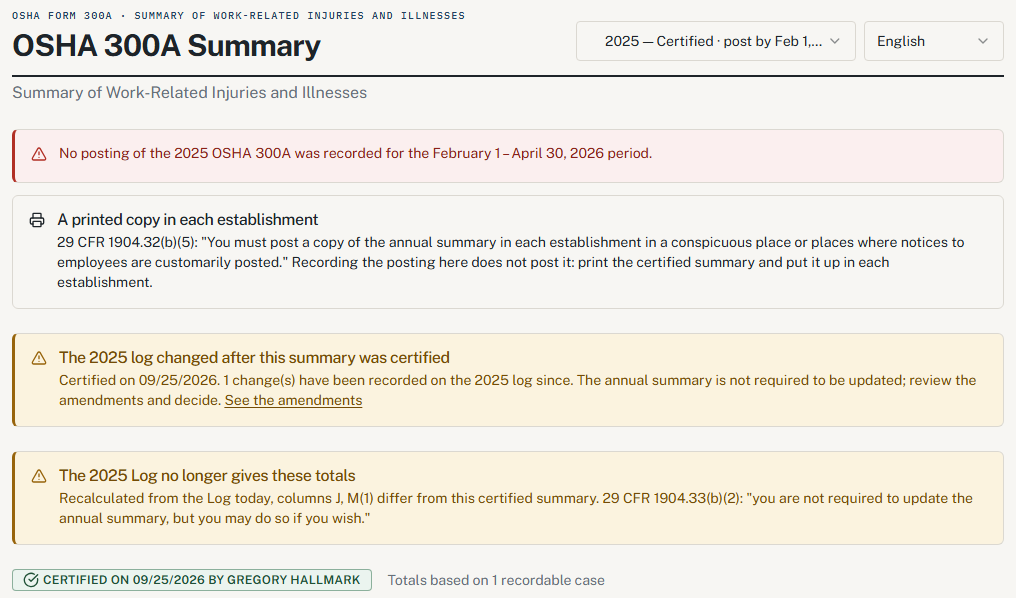
Two checks catch the mistakes that matter more than formatting. The summary has to add up: the injury and illness types in column M equal the cases in columns G to J, a days-away case (H) comes with its days (K), and a restricted case (I) with its restricted days (L). And the file has to match what the executive certified. If a case was added to the Log after the 300A was signed, the Case Data and the certified summary no longer agree, and the upload says something different from the paper on the wall.
Two rejections the CSV specifications don't warn you about
Two refusals don't appear in OSHA's CSV documentation. Both were observed on OSHA's ITA test environment on September 27, 2026, and either could change without notice.
One non-ASCII character rejects the whole file. An em dash pasted from a word processor into an incident description, a curly quote, a non-breaking space or an accented letter is enough. The upload screen's error message lists ASCII characters, which doesn't help you find the dash in case 14.
EIN 123456789 is refused. So is an EIN of nine identical digits. The documentation only asks for nine digits; the refusal arrives by email.
Separately, OSHA's ITA user guide recommends avoiding characters such as ( ) ~ @ # $ % ^ & * ? in text fields. Those produce a warning, not a rejection.
How HazComFast prepares the ITA files
The tier check above runs per establishment, and so does HazComFast. Each establishment keeps its own 300 Log and 300A, with its address, NAICS code and EIN. The app works out whether each one files with the ITA, from peak employment and the establishment's NAICS, and it says so even when the answer is a 300A with zero cases. Construction isn't exempt from keeping the records, and the app says that too.
The files are built from certified 300A summaries only, in the two CSV layouts OSHA publishes: the 300A file, and one Case Data file per establishment. Before any file is produced, the checks above run and name the field at fault: EIN, state, ZIP, NAICS, whole numbers, fewer than 8,760 hours per employee, column M against columns G to J, days for every days-away and restricted case. A Case Data file whose cases differ from the certified 300A is refused. Privacy cases carry no name in the file. Long dashes, curly quotes, non-breaking spaces, accents and symbols such as ½ in case texts are converted to plain ASCII, and anything that can't be converted is refused and named; the establishment name is never changed, because it has to match what you declared to the ITA. EIN 123456789 and nine identical digits are refused, and the discouraged characters get a warning. A 300A can be certified only by one of the four people 1904.32(b)(4) names, after the Log has been reviewed. Once certified, its numbers are frozen, and if the Log changes afterward, the summary tells you.
Get Your 300/301/300A Right Before March 2
Accurate logs make ITA submission painless. Build clean, audit-ready records first, then submit through the ITA before the March 2 deadline.
Know your tier, file the right forms
A 100+ establishment in NAICS 2381 that files only the 300A has left out two forms. HazComFast checks your tier by size and NAICS, keeps the 300 log and 301 reports clean all year, and builds the certified 300A, so March 2 is an export. Check your obligation free, then keep the cycle audit-ready on trial.
The hub & related: OSHA recordkeeping: 300, 300A & 301 · OSHA 300/300A/301 Recordkeeping Guide · When Is an Injury Recordable? · 300A: Posting vs. Electronic Submission · 1904.41 Electronic Reporting (standard)
Sources & verification (verified 2026-07-18): OSHA electronic submission rule, 29 CFR 1904.41, read from the standard text on osha.gov: March 2 annual deadline (1904.41(c)); 100+ establishments in an Appendix B industry (from construction, NAICS 2381 only) submit 300/301/300A (1904.41(a)(2)); 250+ establishments submit 300A (1904.41(a)(1)(ii)); 20–249 establishments in an Appendix A industry submit 300A (1904.41(a)(1)(i)); EIN required (1904.41(a)(4)); submission by manual entry, CSV upload, or API through the ITA. Verify your establishment's size and industry classification against the current ITA coverage list at osha.gov/injuryreporting/ita. Not legal advice.
Frequently Asked Questions
When is the OSHA ITA electronic submission deadline in 2026?
The OSHA Injury Tracking Application (ITA) submission deadline is March 2, 2026, under 29 CFR 1904.41. Covered establishments must electronically submit the prior calendar year's injury and illness data by that date.
Who must submit the 300 and 301 in addition to the 300A?
Establishments with 100 or more employees in an industry listed in Appendix B to Subpart E of Part 1904 must electronically submit the OSHA Forms 300, 301, and 300A. From construction, Appendix B lists a single code: 2381, Foundation, Structure and Building Exterior Contractors. A 100+ establishment in 2381 submits all three (29 CFR 1904.41(a)(2)); the rest of NAICS 23 submits the 300A under 1904.41(a)(1).
Who only has to submit the 300A summary?
Establishments with 250 or more employees that are required to keep OSHA records (and are not partially exempt) submit only the Form 300A annual summary electronically (29 CFR 1904.41(a)(1)(ii)), unless they also fall under the 100-plus Appendix B trigger that requires the 300 and 301 (1904.41(a)(2)).
Does construction have to submit electronically under the ITA?
Only some of it. Appendix B lists one construction code, NAICS 2381 (foundation, structure and building exterior work), so a 2381 establishment with 100 or more employees submits the OSHA 300, 301 and 300A. Building construction (236), heavy and civil (237) and the other specialty trades submit the 300A at 20 or more employees, because Appendix A lists all of NAICS 23 (29 CFR 1904.41(a)(1)(i)). Below 20 employees there is no routine submission unless OSHA asks under 1904.41(a)(3).
What is 29 CFR 1904.41?
29 CFR 1904.41 is OSHA's electronic submission of injury and illness records rule. It defines which establishments must submit data through the Injury Tracking Application (ITA) and sets the March 2 annual deadline.
Do establishments with 20–249 employees have to submit to the ITA?
Yes, if they are in an industry listed in Appendix A to Subpart E of Part 1904. Under 1904.41(a)(1)(i), establishments with 20 to 249 employees in an Appendix A industry electronically submit their Form 300A summary each year by March 2: the same 300A-only obligation as 250+ establishments.
How do I actually submit my data to the ITA?
Create an ITA account, set up an establishment profile for each covered establishment, and provide the establishment's EIN (required under 1904.41(a)(4)). In construction, the establishment is the main or branch office that supervises the work or is the base the crews work from (29 CFR 1904.46), and projects expected to last less than a year can share one 300 Log (1904.30(b)(1)), so you do not create a profile for every jobsite. You can then enter data three ways: manually in the web form, by uploading a CSV file for many establishments at once, or via the ITA API for automated systems. Submit by March 2.
Federal OSHA penalty limits were last checked against the eCFR, OSHA.gov and the Federal Register on October 19, 2026, and HCS transition dates on June 23, 2026. Last reviewed October 14, 2026.
About This Article
Published by: HazComFast
Published: June 25, 2026
Last Updated: October 14, 2026
This content is for informational purposes only and does not constitute legal advice.