Nothing in OSHA's text asks whether your crew has email. We pulled the two standards that define what field workers must be able to do — report injuries, reach their own records, get trained on chemicals, and searched the full current text of each. The word "email" appears zero times in 29 CFR 1904.35 and zero times in 29 CFR 1910.1200. OSHA attaches every right and every duty to a person — never to an inbox.
Safety software vendors made the opposite bet. Most platforms will not create a worker until someone types an email address into the account form. On a commercial jobsite, that one form field collides with how crews actually work — and the collision produces a workaround that is worse than the problem.
Monday, 6:40 a.m., two new hires at the gate
A drywall sub shows up with two new workers. Orientation is at 7:00. The foreman opens the safety app to add them and hits the wall in the first field: Email address (required).
One worker has a phone with no email set up on it. The other has an address he has not opened "since the kids set it up." The foreman has nineteen minutes, and he has three options. All three get used on real jobsites every week:
- The shared account. There is already a login called
crew2@that the whole trailer uses. The new hires will "just use that for now." - The invented address. The foreman types
firstname.lastname@gmail.com, guessing, or makes one up on the company domain. Nobody will ever read what lands there. - Skip it. They will get added "when the office is in." The office is busy. They never are.
Each option fails differently, and the first one — the one that feels the most pragmatic — fails the worst.
What the standards actually attach to a person
Before looking at why, it is worth being precise about what the rules ask, because the rules are what an inspector will read back to you.
Injury reporting must not be gated. Under 29 CFR 1904.35(b)(1)(i), you must establish a reasonable procedure for employees to report work-related injuries and illnesses promptly and accurately, and the rule defines the boundary itself: "A procedure is not reasonable if it would deter or discourage a reasonable employee from accurately reporting a workplace injury or illness." A reporting channel that quietly assumes every worker owns and checks an inbox is a barrier the rule tells you to look for. The rule then stacks two duties on top: 1904.35(b)(1)(ii) makes you inform each employee of the procedure, and 1904.35(b)(1)(iii)(A) makes you tell each employee they have the right to report. All three duties run to "each employee": the standard tests the procedure against a reasonable employee, not against a reasonable office manager.
Access rights run person by person. 1904.35(b)(2)(v)(A) is written for one individual at a time: when an employee, former employee, or personal representative asks for the 301 incident report "describing an injury or illness to that employee or former employee," you owe a copy by the end of the next business day. The 300 Log goes to any employee or authorized representative on the same next-business-day clock under 1904.35(b)(2)(iii), and the first copy is free under 1904.35(b)(2)(vi). Even the union-side rule is person-shaped: under 1904.35(b)(2)(v)(B), an authorized representative gets 301 copies within 7 calendar days, limited to the "Tell us about the case" section. These are individual rights. A system that cannot tell workers apart cannot serve them.
Training attaches at assignment. 29 CFR 1910.1200(h)(1) requires "effective information and training on hazardous chemicals in their work area at the time of their initial assignment," and again whenever a new hazard enters the work area. The clock starts per worker, on the day that worker starts. Effectiveness is judged on people. When someone is hurt, the question is never whether the crew was generally trained. It is whether this worker was — informed of the operations where hazardous chemicals are present under 1910.1200(h)(2)(ii), and trained on the protective measures of 1910.1200(h)(3).
None of these provisions mentions an account, a password, or an email. They mention the person. Your software's job is to keep the person attached to the record, and that is exactly what the workarounds destroy.
Is a shared login a problem under OSHA recordkeeping rules?
Skip-it gets caught early: the worker is missing from the roster the day an inspector, or a plaintiff's lawyer, asks who was trained. The invented address does quieter damage: any notice, assignment, or password reset sent to it is never read by anyone.
The shared login is different. Nobody picks it out of laziness — a foreman enrolling thirty people on a Monday morning picks the one login that already works, and gets the crew through the gate. And then it looks like it works. Toolbox talks get signed. Inspections get submitted. Acknowledgments pile up. Then one day the question that all of those records exist to answer finally gets asked:
"Who signed this?"
And the honest answer is: crew2@. Four people had that password in March; six had it by June; one of them left in July on bad terms. The signature at the bottom of the hazard acknowledgment names an account, not a person — a record signed by a shared login proves that somebody clicked, and an acknowledgment that cannot name its acknowledger is not evidence of much at all. What to do on the day that person leaves, and which records must keep naming them, is its own checklist.
Electronic signatures hold up fine on OSHA records — we walk through the basis for that in our guide to e-signatures on OSHA forms — but everything in that analysis rests on the signature resolving to one person. The shared account breaks that link while leaving the paperwork looking complete, and that is what makes it dangerous: you find out the records are hollow at the moment you need them solid.
There is a second cost, less dramatic and paid daily: a shared account sees everything the account sees. The two-line summary of a coworker's injury on the 300 Log is information any employee may request under (b)(2)(iii) — but your system showing every user the same dashboard, the same assignments, the same history, means nobody's view matches their actual role. Records access under 1904.35 has boundaries; one login for six people has none. We map who may see what — and where the walls are supposed to stand — in who can see your OSHA 300 Log and injury records.
How do you evaluate safety software for workers without email?
Strip the vendor language away and ask four questions. They are answerable in a ten-minute demo:
- Can a worker exist without an inbox? Not "can you type a fake one" — can the system issue an identity that does not route through email at all?
- Can that worker sign in without a keyboard? Gloves, rain, a cracked screen protector, and a password policy do not mix. If sign-in takes typing, sign-in stops happening, and the shared tablet stays logged in as whoever came first.
- Who mints and who revokes the credential? The employer should issue it and be able to kill it. If identity depends on the worker's personal accounts, turnover leaves you holding records tied to addresses you never controlled.
- Does each record name a person? Open any record the system produced — a talk signature, an acknowledgment, an inspection — and read who it names. If the answer is an account label, you have found the same shared-login problem under a different name.
The four questions cut through the feature names to the thing that matters: when this record is challenged, does it name a person? A fifth question, about the morning the only administrator is locked out, is in what OSHA requires from your recordkeeping software.
How HazComFast answers the sign-in question
A badge instead of a password
In HazComFast, an admin generates credentials for each worker from the Users screen, and the worker signs in by scanning their QR badge — no typing at the gate, no inbox required for the scan, and every signature, acknowledgment, and report that follows lands on that worker's own name. One credential, one person, one line of accountability.
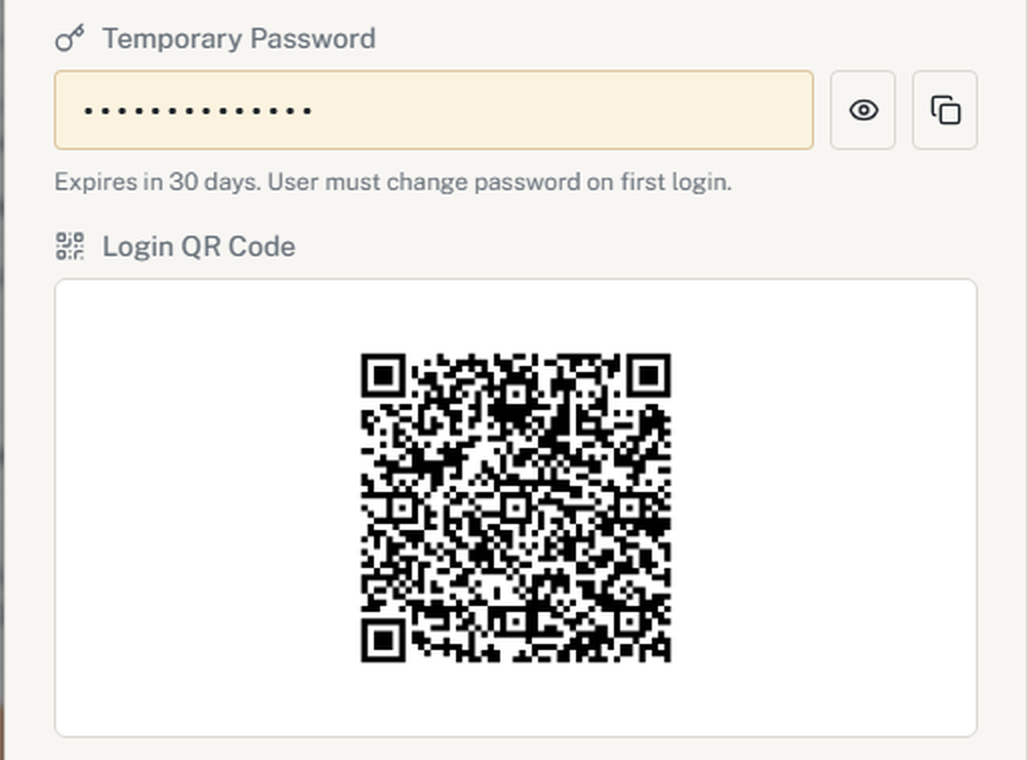
That is the whole pitch, deliberately: identity the employer issues, sign-in a gloved hand can do, records that name people. The rest of the compliance stack — the 300 Log, the 301 forms, training records — only works if that first step does.
Resending an invite without stranding anyone
The question that comes two days after the crew list goes in: one worker never got the email. You hit Resend. Now there are two emails in that inbox, and the usual outcome is that the first link is already dead and the worker opens it anyway.
Why a stranded invite is a compliance problem and not an IT annoyance: the clocks in the standards attach to the person, on the day that person starts. 29 CFR 1910.1200(h)(1) wants effective information and training at the time of initial assignment, 1910.1200(h)(2)(iii) wants that worker informed of where the program, the chemical list and the sheets are, and 29 CFR 1926.59 brings all of it onto a construction site. A worker who cannot get in on day one is a worker whose training record has no owner, and that is the record an inspector asks for by name.
The old link retires once the new email is out. The token on the first link is replaced after the new email has gone, not before. A worker who opens the first email during that window lands on a working link rather than on an expired one. It is a small ordering decision and it is the whole difference between a resend that helps and a resend that creates a support call.
You hear when they join. When the invited person accepts, the admin who invited them gets a notification in the app and an email. Nobody has to refresh a pending list to find out whether the crew is in.
What this does not do, and it is better to know now: the delivery time of the email belongs to the mail provider and to the recipient's inbox, so there is no promise to make there. Try it before you rely on it — invite one address, resend from the pending invitations tab, then accept from the inbox and watch the admin side say "Invitation accepted."
And when there is no phone to scan
The badge assumes a camera and a working phone. A crew at the gate at 6:40 a.m. does not always have either: a cracked screen, a phone left in the truck, one tablet shared by the whole trailer. So the same sign-in screen now carries a second door: an employee ID and a PIN, issued by the supervisor, that needs no inbox, no personal phone and no camera. Like every sign-in it needs a connection to the server. It identifies the person; it does not attest that the person is who they claim, any more than a badge does, so the supervisor who hands out the PIN remains the control. After five failed attempts on one employee ID the screen locks that ID for fifteen minutes and says so, in English or Spanish: "Too many attempts. Try again in 15 minutes, or ask your supervisor for a badge."
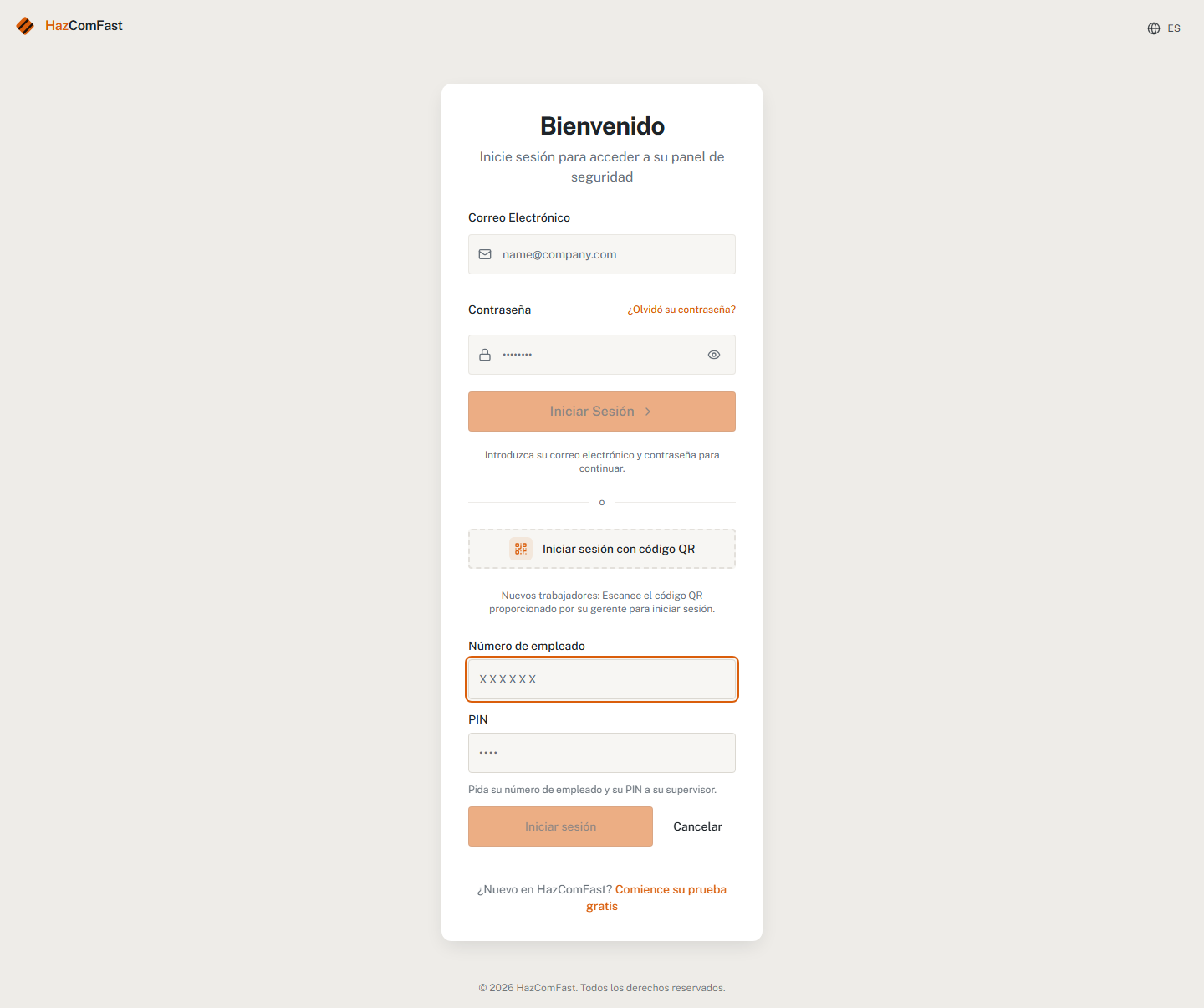
Two doors, one rule: once the worker is signed in, the talk they sign and the report they file carry their name.
The bottom line
The injury-reporting and hazard communication standards we measured — 29 CFR 1904.35 and 29 CFR 1910.1200 — never ask whether a worker has an email address: against the full current text of each, the word does not appear. What they ask is harder: a reporting procedure that does not deter the worker standing in front of you, records each person can reach, training that attaches to each individual on day one. An email-required account form fails the worker at the gate; the shared login that replaces it fails the employer later, by filling the file with signatures that name nobody. Give each worker a credential you issue and they can use — and check any platform you evaluate with the four questions above.
Related reading
- The OSHA recordkeeping hub — Forms 300, 300A & 301 — every duty these identities feed, in one place.
- Who can see your OSHA 300 Log and injury records — the access map under 1904.35, requester by requester.
- Are electronic signatures valid for OSHA records? — why attribution, not ink, is what makes a signature hold.
- The complete OSHA 300/300A/301 recordkeeping guide — the forms these identities feed.
Frequently Asked Questions
Does OSHA require employees to have an email address?
No. The word email does not appear anywhere in 29 CFR 1904.35, which governs employee reporting and access to injury records, or in 29 CFR 1910.1200, which governs hazard communication and training. Both standards attach rights and duties to the person, never to a contact method.
Is a shared login a problem under OSHA recordkeeping rules?
OSHA does not regulate logins. The problem is what a shared login does to your records. 1904.35(b)(2)(v)(A) gives each employee a right to the 301 report describing their own injury, and access rights under 1904.35(b)(2) run person by person. Records built on one shared account cannot show which person acknowledged a hazard, signed a talk, or reported an injury.
Can an injury reporting procedure require workers to use email?
1904.35(b)(1)(i) requires a reasonable procedure for reporting work-related injuries, and says a procedure is not reasonable if it would deter or discourage a reasonable employee from accurately reporting. A channel that assumes an inbox many crew members do not have is exactly the kind of barrier that test invites you to examine.
Do training records have to identify each worker individually?
1910.1200(h)(1) requires effective information and training for employees at initial assignment and when a new hazard is introduced. Effectiveness is assessed on people, not on groups sharing a device: you need to be able to say which worker was trained, on what, and when.
What should replace a password for field workers?
A credential the employer issues and controls, tied to one named person, that works without a keyboard. A QR badge does this: the admin generates it, the worker scans it to sign in, and the records that follow carry that worker's name, so an injury report under 1904.35(b)(1)(i) or a training sign-off under 1910.1200(h)(1) points to one identifiable person.
OSHA figures and citations here come from our regulatory source-of-truth modules, last checked against the eCFR, OSHA.gov, and the Federal Register on October 5, 2026. Last reviewed September 15, 2026.
About This Article
Published by: HazComFast
Published: September 5, 2026
Last Updated: September 15, 2026
This content is for informational purposes only and does not constitute legal advice.